How to see your ChatGPT usage and reset time live, before you run out?
If you use ChatGPT every day, you’ve probably seen this message:
“You’ve reached your limit.”
It usually shows up at the worst time: halfway through debugging, in the middle of a long document, or just as an idea is coming together.
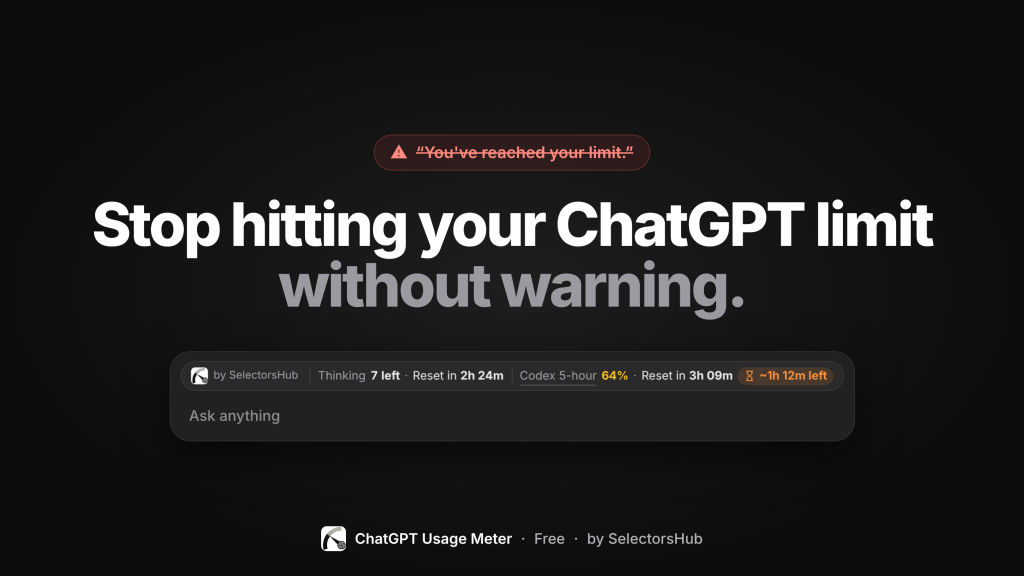
ChatGPT has usage limits on Thinking messages, Codex and other features. But it doesn’t make it easy to see:
- How much you’ve already used
- How much you have left
- When your limit resets
So most people find out they’ve hit the limit only when they’re locked out. That means:
- ❌ Lost momentum in the middle of important work
- ❌ No idea whether to wait 10 minutes or 3 hours
- ❌ Unfinished tasks and broken focus
- ❌ Saving the important questions for later “just in case”
You’re working blind, and the limit always catches you by surprise.
The solution: ChatGPT Usage Meter
ChatGPT Usage Meter is a free browser extension that shows your ChatGPT usage live, right above the chat box, where you’re already looking.
At a glance, you can see:
- Thinking messages left, and when they reset
- Codex usage: your 5-hour and weekly limits (or monthly, on the Free plan), as a percentage
- Exact reset times, so you know when you can continue
- A time-left forecast: roughly how long you have at your current pace
- Chat size: how big your current conversation is getting
Get warned before you run out
ChatGPT Usage Meter alerts you at 75%, 90% and 100% of your limit.
So instead of getting cut off mid-task, you know ahead of time to:
- finish the important part first
- save or summarise your work
- plan around the next reset
Everything in one click
Click the toolbar icon for the full picture:
- Every limit and reset time
- Usage per feature
- How many messages you’ve sent with each model
Clean and out of your way
- Minimal design that matches ChatGPT’s light and dark themes
- Collapsible strip: shrink it any time
- Fully customisable: show only what matters to you
Private by design
- Talks only to chatgpt.com, the site you already use
- No outside servers and no tracking
- Your conversations never leave your browser
- Open source: https://github.com/SelectorsHub/ChatGPT-Usage-Meter
Who is it for?
- Developers using Codex and Thinking models for coding
- Writers and marketers working on long content
- Students and researchers who rely on ChatGPT every day
- Anyone tired of surprise lockouts
Try it free
ChatGPT Usage Meter is free and works on Chrome and Edge. There’s no sign-up and no setup: install it, open ChatGPT, and your usage appears right away.
👉 Get it here: https://www.selectorshub.com/chatgpt-usage-meter/
Know your limits before you hit them.
ChatGPT Usage Meter is a free tool by SelectorsHub and is not affiliated with OpenAI.
Recent Post